
Your business website does more than display information. It may collect customer enquiries, store personal details, process payments, and connect to important business tools.
But how often do you check whether it is secure?
A website can look professional and still have security weaknesses. Outdated software, weak passwords, unnecessary user accounts, missing backups, and poorly protected contact forms can put your business and customers at risk.
The good news is that you do not need to be a cybersecurity expert to check the basics.
Here is a practical website security checklist every small business owner should follow.
1. Check That Your Website Uses HTTPS
Start with the basics: your website should use HTTPS.
HTTPS encrypts information travelling between your website and its visitors. This is especially important when customers submit contact details, log in, or make payments.
Your checklist:
- Your website address begins with
https://. - Your SSL/TLS certificate is valid and has not expired.
- Visitors using the HTTP version are automatically redirected to HTTPS.
- There are no browser warnings about an insecure connection.
- Website pages do not load important resources over insecure HTTP connections.
Why it matters: Without properly configured HTTPS, information exchanged with your website may be exposed to interception. However, HTTPS alone does not make a website completely secure. It is one layer of protection, not a replacement for other security measures.
2. Keep Your Website Software Updated
Outdated website software is one of the security risks business owners should not ignore.
If your website uses WordPress, its core software, themes, and plugins need regular attention. Updates often include security fixes that address known vulnerabilities.
Your checklist:
- Your CMS or website platform is running a supported version.
- Themes and plugins are updated regularly.
- Unused plugins and themes have been removed.
- Software is downloaded from trusted sources.
- Updates are tested where necessary before being applied to important business websites.
Why it matters: An outdated plugin or theme can create a weakness that attackers may exploit. Keeping software updated helps reduce that risk.
3. Secure Website Login and User Access
Not everyone working with your website needs administrator access.
For example, someone responsible for writing blog posts does not necessarily need permission to change website settings or install plugins.
Limiting access helps reduce the damage that can happen if an account is compromised.
Your checklist:
- Every user has their own login account.
- Strong, unique passwords are used.
- Multi-factor authentication (MFA) is enabled wherever available.
- Users receive only the permissions required for their roles.
- Former employees and external developers no longer have unnecessary access.
- Administrator accounts are reviewed regularly.
- Hosting, domain registrar, and website management accounts are also protected.
Why it matters: A compromised administrator account can give an attacker control over important parts of your website. Protecting the login is just as important as protecting the website itself.
4. Make Sure Your Website Has Reliable Backups
Imagine losing your website content, customer enquiry records, or important files because of a technical failure or cyberattack.
Would you be able to restore everything?
Backups provide a recovery option when something goes wrong. But simply having a backup option is not enough. You need to know that your backups are recent and usable.
Your checklist:
- Automatic backups are configured.
- Website files and databases are included.
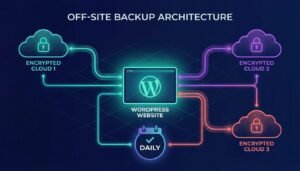
- Backups are stored separately from the live website where possible.
- Backup frequency matches how often your website changes.
- Older backup versions are retained appropriately.
- Restoration is tested periodically.
- Someone knows how to restore the website if needed.
Why it matters: A working backup can help your business recover more quickly from data loss, accidental changes, or a security incident.
5. Protect Contact Forms and Customer Information
Contact forms are essential for businesses that receive enquiries online. However, they can also attract spam and collect personal information that needs to be handled responsibly.
A form should collect only the information your business actually needs.
Your checklist:
- Contact forms use HTTPS.
- Spam protection is enabled where appropriate.
- Form submissions are sent to the correct business email address.
- Customer information is not unnecessarily exposed or stored.
- Access to submitted enquiries is restricted to authorised staff.
- Forms are tested regularly to confirm they work.
- A privacy policy explains how submitted information is handled.
Why it matters: Poorly managed forms can expose customer information, create spam problems, or cause genuine business enquiries to go unnoticed.
6. Choose a Reliable Hosting Provider
Your website’s security also depends on the infrastructure where it is hosted.
A reliable hosting provider should offer appropriate security features and clear information about its responsibilities.
Your checklist:
- Your hosting provider offers secure server infrastructure.
- Server software and security patches are maintained.
- Firewalls or other suitable protective measures are available.
- Backups and recovery procedures are clearly explained.
- Technical support is available when problems occur.
- You know who is responsible for website security and maintenance.
Why it matters: Website security is a shared responsibility. Your hosting provider, website developer, and business may each be responsible for different parts of the setup.
7. Monitor Your Website for Suspicious Activity
Security is not a one-time task. A website that was secure last month may develop problems if software becomes outdated or an account is compromised.
Regular checks can help you identify issues before they become bigger problems.
Your checklist:
- Review administrator login activity.
- Look for unfamiliar user accounts or unexpected website changes.
- Check for malware or security warnings.
- Monitor unusual website behaviour or unexpected redirects.
- Review security alerts from your hosting provider.
- Know who to contact if your website is compromised.
Why it matters: Early detection can make it easier to investigate suspicious activity and take corrective action.
Your Monthly Website Security Checklist
Use this quick checklist to keep track of your website’s basic security.
- HTTPS and SSL/TLS certificate checked.
- CMS, plugins, and themes updated.
- Unused plugins and accounts removed.
- Passwords and MFA reviewed.
- Backups completed and restoration process checked.
- Contact forms tested.
- Hosting and security alerts reviewed.
- Website activity checked for anything unusual.
Some tasks, such as enabling MFA, are setup tasks rather than monthly changes. Review them periodically to make sure protection remains enabled.
What Should You Do If Your Website Is Not Secure?
If you discover a problem, do not ignore it.
Start by identifying the issue and contacting your hosting provider or website administrator. If you suspect a compromise, use a trusted device to secure affected accounts, preserve relevant logs and evidence, and arrange a professional investigation and recovery.
Avoid making random changes to a potentially compromised website. You could accidentally remove useful evidence or make recovery more difficult.
For more detailed guidance, refer to the WordPress Security Handbook and the CERT-In advisory for MSMEs.
Keep Your Business Website Protected with Website Desks
Website security is not just about installing an SSL certificate or adding a security plugin. It requires regular updates, controlled access, reliable backups, monitoring, and ongoing maintenance.
At Website Desks, we help businesses maintain and improve their websites through website maintenance, technical support, security-related assistance, and development services.
Whether your website needs a routine health check or ongoing technical support, having the right team behind it can make website management easier.
Explore our Website Maintenance and IT Support services or contact Website Desks to discuss your website requirements.
A secure website helps protect your business, your customers, and the trust you have built. Make website security a regular part of your business routine.
Frequently Asked Questions
1. How do I know if my business website is secure?
Start by checking HTTPS, software updates, administrator access, backups, contact forms, and hosting security. A professional security review can identify issues that may not be visible during normal browsing.
2. Is an SSL certificate enough to secure my website?
No. An SSL/TLS certificate enables encrypted HTTPS connections, but it does not protect against weak passwords, outdated plugins, malware, or unauthorised access.
3. How often should I update my website?
Check for updates regularly and apply security updates promptly. The exact schedule depends on your website platform, hosting environment, and the software you use.
4. How often should I back up my business website?
It depends on how frequently your website changes. A frequently updated website may need daily backups, while a mostly static website may need less frequent backups. Always test that backups can be restored.
5. Can a small business website be hacked?
Yes. Businesses of all sizes can be targeted. Basic security practices such as MFA, regular updates, access control, and reliable backups can help reduce risk.